IVR self service: a strategy for customer-centric businesses

Prashanth Kancherla

Aug 3, 2023 | 11 mins read
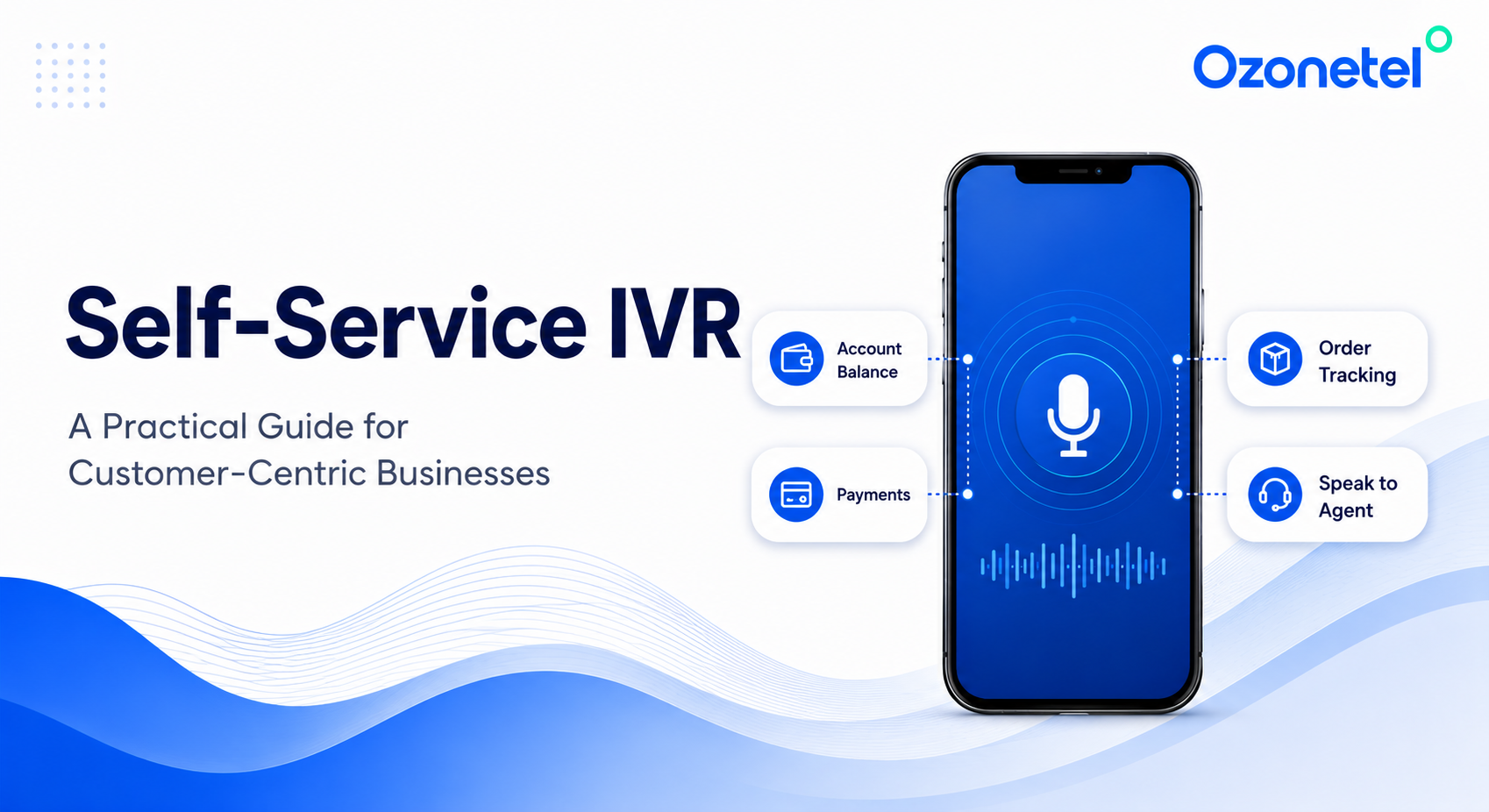
Most people calling a call center have already tried everything else first. A quick look at the app, a scan through the FAQ section, or maybe a question typed into a chatbot that didn’t quite get it right. Harvard Business Review puts it at 81% of customers attempting self-service before dialing a live agent. So, by the time call center agent actually picks up the phone, they’re not looking for a conversation — they want an answer, and they’d rather not wait for it.

 That’s the entire case for IVR self-service: a system that recognizes who’s calling, understands what they need, checks your CRM in real time, and resolves it before anyone presses zero.

 A well-built IVR self-service system typically resolves 65–90% of routine calls without an agent — This guide covers what IVR self-service actually is, where it works best, what a healthy containment rate looks like, and how to build one in five steps.

What Is IVR Self-Service?

IVR self-service is the part of an Interactive Voice Response system that resolves a caller’s request completely — no transfer, no agent, no queue. Resolve is the key word there. An IVR menu that loops a customer through four options and then parks them on hold for long isn’t really self-service. Real self-service means the caller hangs up only after their problem is resolved.

Agent-Assisted IVR vs. IVR Self-Service: What’s the Difference?

Agent-assisted IVR gathers a bit of context before routing the call to a human. On the other hand, Self-service IVR resolves the call itself without any human involvement.
Agent-Assisted IVR IVR Self-Service
What it’s actually doing Routing the caller to a human Resolving the caller’s request itself
CRM Integration Nice to have Non-negotiable
Menu Depth Shallow, then transfer Deep enough to fully resolve
Success Metric Transfer rate, queue time Containment rate
Personalization Minimal — same flow for everyone High — recognizes the caller, pulls history
When it falls Caller waits for an agent Caller gives up, frustrated

What Can IVR Self-Service Handle? (Common Use Cases)

A powerful IVR system delivers the most value when the request is high-volume, repetitive, and doesn’t require human judgment. These are the conversations customers want resolved quickly without agent intervention. Here are some of the most common use cases.

Account and Balance Checks

One of the most common IVR use cases across industries. Customers authenticate using their phone number or account ID, and the system instantly retrieves information like account balances, due dates, or policy details from backend systems—without waiting for an agent.

Order Tracking

Customers usually just want a quick update on where their order is—not a long wait on hold. That’s exactly what Ozonetel helped solve for a growing logistics business. Customers requesting self-pickup automatically received the nearest pickup location via SMS, while calls reaching the wrong merchant were intelligently rerouted using the order ID, ensuring customers reached the right destination the first time.

Appointment Booking, Rescheduling, and Cancellations

Healthcare and diagnostics providers rely heavily on IVR for appointment management. The key to making this work is simple: the IVR shouldn’t just read appointment information—it should be able to update the scheduling system in real time.

Payments and Payment Reminders

IVR can securely accept card payments, automate balance inquiries, and even let customers reschedule payments during the same interaction. One NBFC reduced response times from 2 minutes to just 32 seconds by automating payment-related requests through IVR.

Callback Requests

Not every customer wants to navigate menus or wait in a queue. Offering a callback option lets customers keep their place without staying on the line. For businesses handling sudden spikes in call volume, this can significantly reduce call abandonment while easing pressure on agents.

Language-Based Routing

Customers are far more likely to complete self-service when it’s available in their preferred language. Ozonetel’s  IVR  provides

Simplify Appointment Scheduling with AI-Powered IVR

Deliver 24/7 appointment booking, rescheduling, and cancellations while reducing call volumes.

Real Results: How Businesses Put IVR Self-Service to Work

The value of IVR self-service isn’t measured by the number of menu options it shows up in faster resolutions, fewer repeat calls, and lighter workloads for agents. Here’s how businesses across industries are using it to solve real operational challenges.
Stockbroking

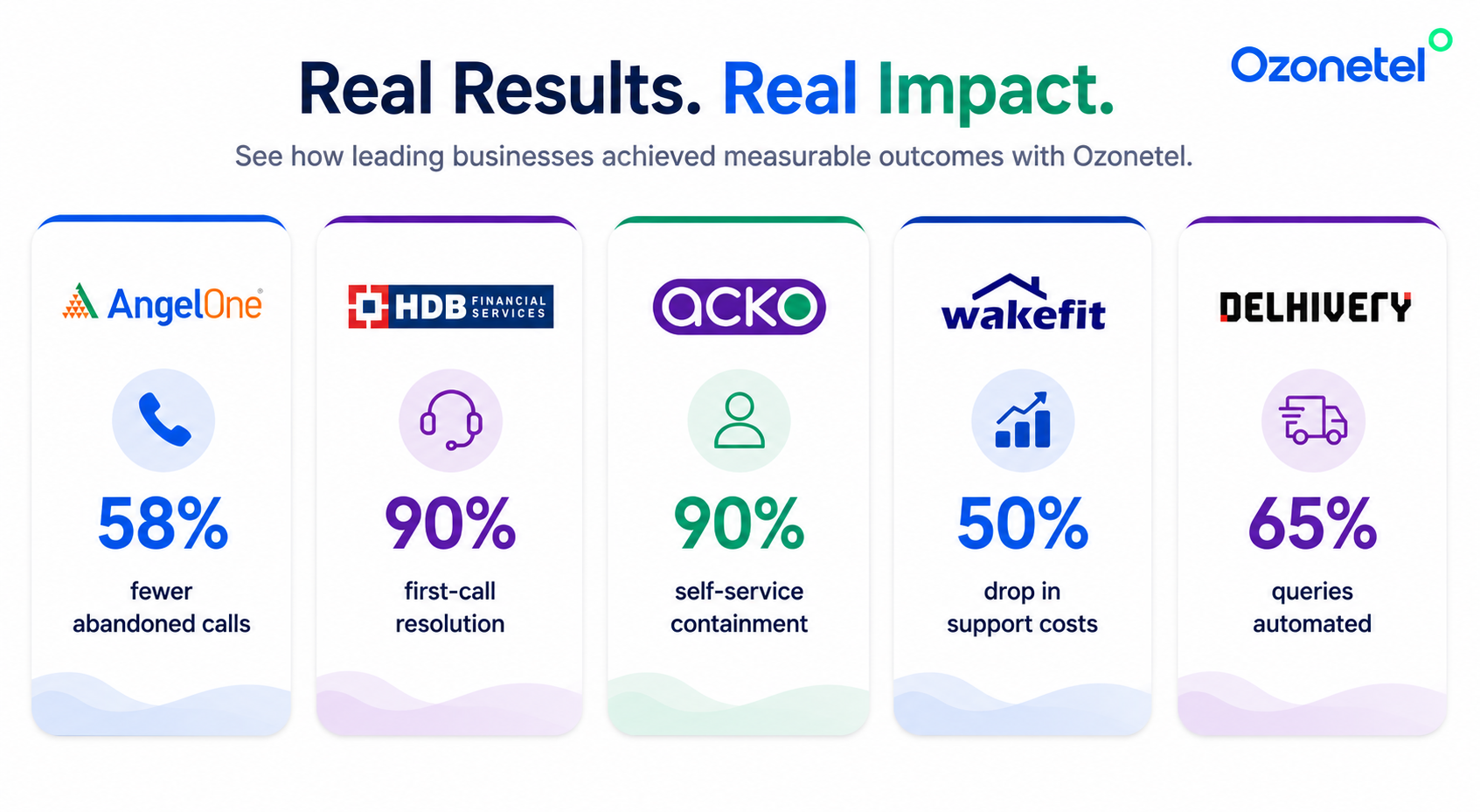
A leading stockbroking platform was handling 100,000+ calls a day, with peaks of 4000 concurrent calls during volatile trading sessions—enough to overwhelm its legacy systems. After moving to Ozonetel’s cloud contact center, self-service IVR automated 35–40% of incoming calls, reducing call abandonment by 58%.

HDB Financial Services

HDB Financial Services automated loan servicing, payment reminders, and policy-related requests through self-service IVR, resolving 70% of customer queries without agent intervention. When a call did need an agent, SugarCRM integration provided a complete customer view, helping achieve 90% first-call resolution while reducing turnaround time by 5%.

ACKO

For ACKO, the challenge wasn’t call volume—it was routing customers to the right resolution quickly. A predictive IVR used CRM data such as policy expiry and claim status to personalize the call flow before customers spoke to an agent. The result was 20% less time spent in IVR, 20% better routing accuracy, 50% faster resolutions, and 90% CSAT.

Wakefit

Wakefit struggled with repeat calls because customers kept contacting support for order, shipment, payment, and refund updates. By enabling self-service IVR for these routine requests, repeat calls dropped from 2.7 to 2.0 per customer, overall call volume fell by 26%, first-call resolution improved 5X, and operational costs decreased by 25%.

See What AI-Powered IVR Could Do for Your Contact Center

Types of Self-Service IVR

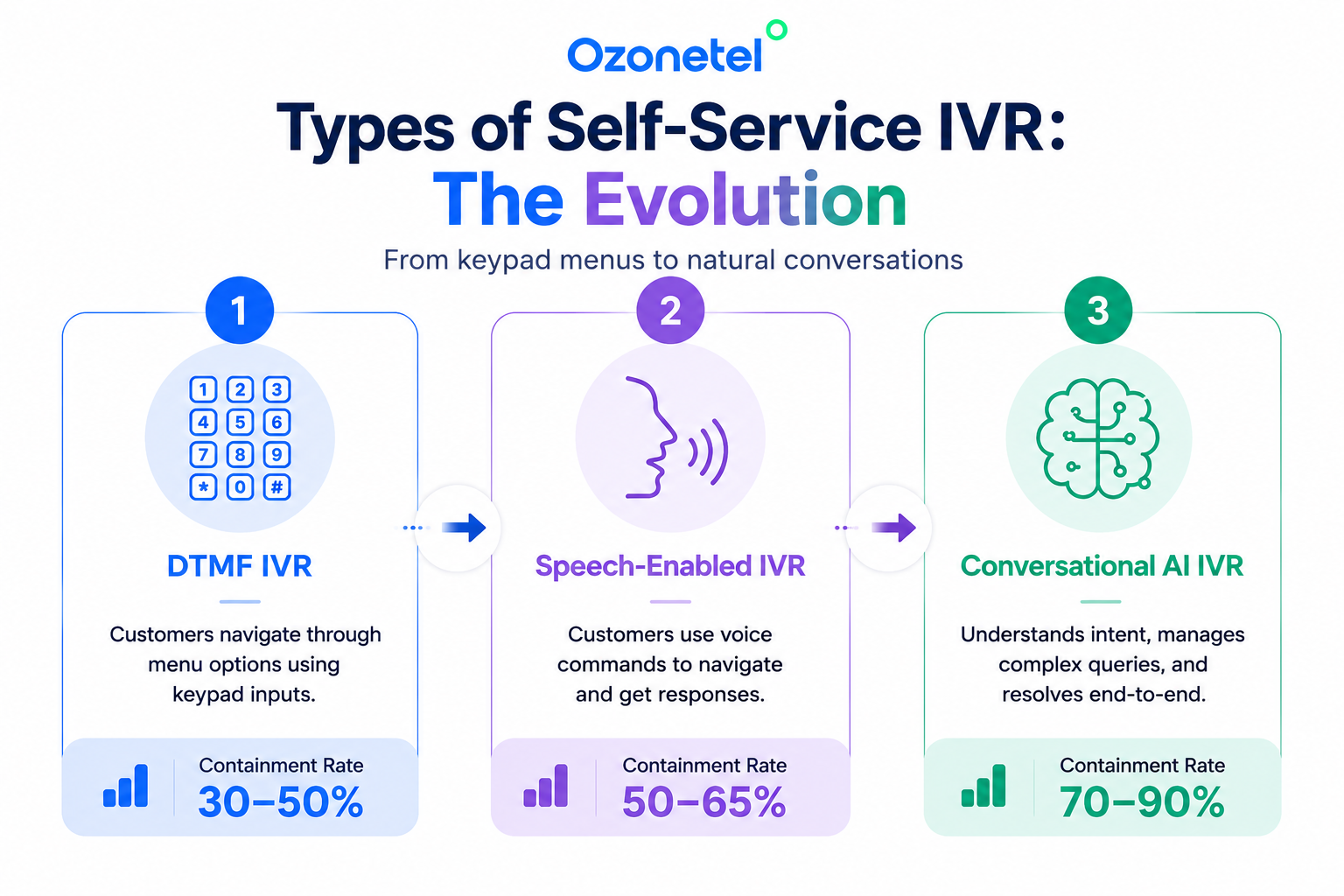
Not all IVR set ups work the same way. Over the years, IVR has evolved from simple keypad menus to AI-powered conversations that can resolve complex customer requests. Understanding the different types of IVR helps you decide which approach best fits your business—and whether it’s time to upgrade.
1. DTMF IVR (Keypad-Based IVR)

DTMF (Dual-Tone Multi-Frequency) IVR is the traditional “Press 1, Press 2” system. Customers navigate menus using their phone keypad to complete simple tasks like checking an account balance, paying a bill, or reaching the right department.

It works well for straightforward, predictable requests. But every new use case requires another menu option, making call flows longer and more frustrating over time. Since traditional DTMF IVRs typically operate without CRM integration, they can’t personalize the experience or recognize who’s calling.

Best for:

  • Account balance inquiries
  • Bill payments
  • Basic call routing
  • Frequently asked questions

2. Speech-Enabled IVR

Speech-enabled IVR replaces keypad inputs with basic voice commands. Instead of pressing numbers, customers can simply say phrases like “Track my order” or “Check my balance.”

This makes self-service faster and reduces menu depth. However, speech-enabled IVRs generally recognize only predefined commands. If callers phrase a request differently or ask follow-up questions, the interaction often falls back to an agent.

Best for:

  • Order tracking
  • Appointment status
  • Balance inquiries
  • Mid-complexity customer requests

3. Conversational AI IVR

Conversational AI IVR takes self-service beyond menus and scripted commands. Using Natural Language Processing (NLP) and AI, it understands customer intent, responds naturally, and maintains context throughout the conversation.

Customers can explain their issue in their own words, ask follow-up questions, and complete more complex tasks without repeating information. By integrating with CRM and backend systems, conversational IVR can personalize every interaction and automate end-to-end customer journeys.

For example, ACKO’s Smart IVR uses CRM data such as policy status and claim history to predict why a customer is calling and route them directly to the right resolution path.

Best for:

  • Insurance claims
  • Loan servicing
  • Banking
  • Customer support automation
  • End-to-end voice self-service

DTMF IVR vs Speech IVR vs Conversational AI IVR

The biggest difference between the three IVR systems isn’t how they answer calls—it’s what they can resolve. Here’s how the three main types compare.
Feature DTMF IVR Speech-Enabled IVR Conversational AI IVR
Customer Input Keypad Basic voice commands Natural language conversation
Handles Complex Queries No Partially Yes
Typical Self-Service Rate 30–50% 50–65% 70–90%
CRM Integration Limited Available Native
Personalization Minimal Basic Advanced
Best For Call routing & FAQs Routine customer requests End-to-end customer self-service

Not Sure Which IVR Is Right for Your Business?

See how AI-powered IVR can fit into your existing contact center without replacing your current telephony setup.

What Is a Good IVR Self-Service Rate?

A good IVR self-service rate—also known as the containment rate—measures the percentage of customer calls fully resolved within the IVR, without needing an agent. It’s one of the most important metrics for evaluating how well your IVR is performing.

Containment Rate Formula

Example:

  • Total inbound calls = 10,000
  • Calls resolved within the IVR = 7,200

Containment Rate = (7,200 ÷ 10,000) × 100 = 72%

A good benchmark is:

  • Speech-enabled IVR: 65–80%
  • Conversational AI IVR: 70–90%

If your containment rate consistently falls below 50%, the issue is usually the design of the self-service experience rather than the technology itself. Common reasons include:

  • Menus designed around internal teams instead of customer intent.
  • Limited or no CRM integration, forcing every interaction to start without context.
  • No natural language understanding, causing anything outside predefined commands to fail.
  • No clear fallback to a live agent when self-service can’t resolve the request.

Addressing these gaps often has a bigger impact on containment than redesigning the IVR from scratch.

Business Benefits of IVR Self-Service

The self-service extend well beyond reducing call volumes. It helps businesses operate more efficiently while giving customers quicker, easier access to the support they need.

Lower Cost Per Call

Every query resolved through self-service reduces the need for agent intervention. Higher containment rates lower support costs, improve agent productivity, and help businesses scale without adding headcount. By enabling IVR deflection, routine requests are resolved before they reach an agent, shortening queues and freeing support teams to handle more complex customer needs.

More Time for High-Value Conversations

Automating routine requests like account inquiries, order tracking, appointment updates, and payments frees agents to focus on conversations that require judgment, empathy, or problem-solving—improving both productivity and service quality.

24/7 Customer Support

Unlike agent-assisted support, IVR is always available. Customers can check an order status, make a payment, or reschedule an appointment whenever they need to, without waiting for business hours.

Faster Service and Better Customer Experiences

Customers get answers immediately instead of waiting in queues, while agents spend less time handling repetitive requests. The result is shorter wait times, quicker resolutions, and a smoother support experience across every interaction.

How to Implement IVR Self-Service Successfully

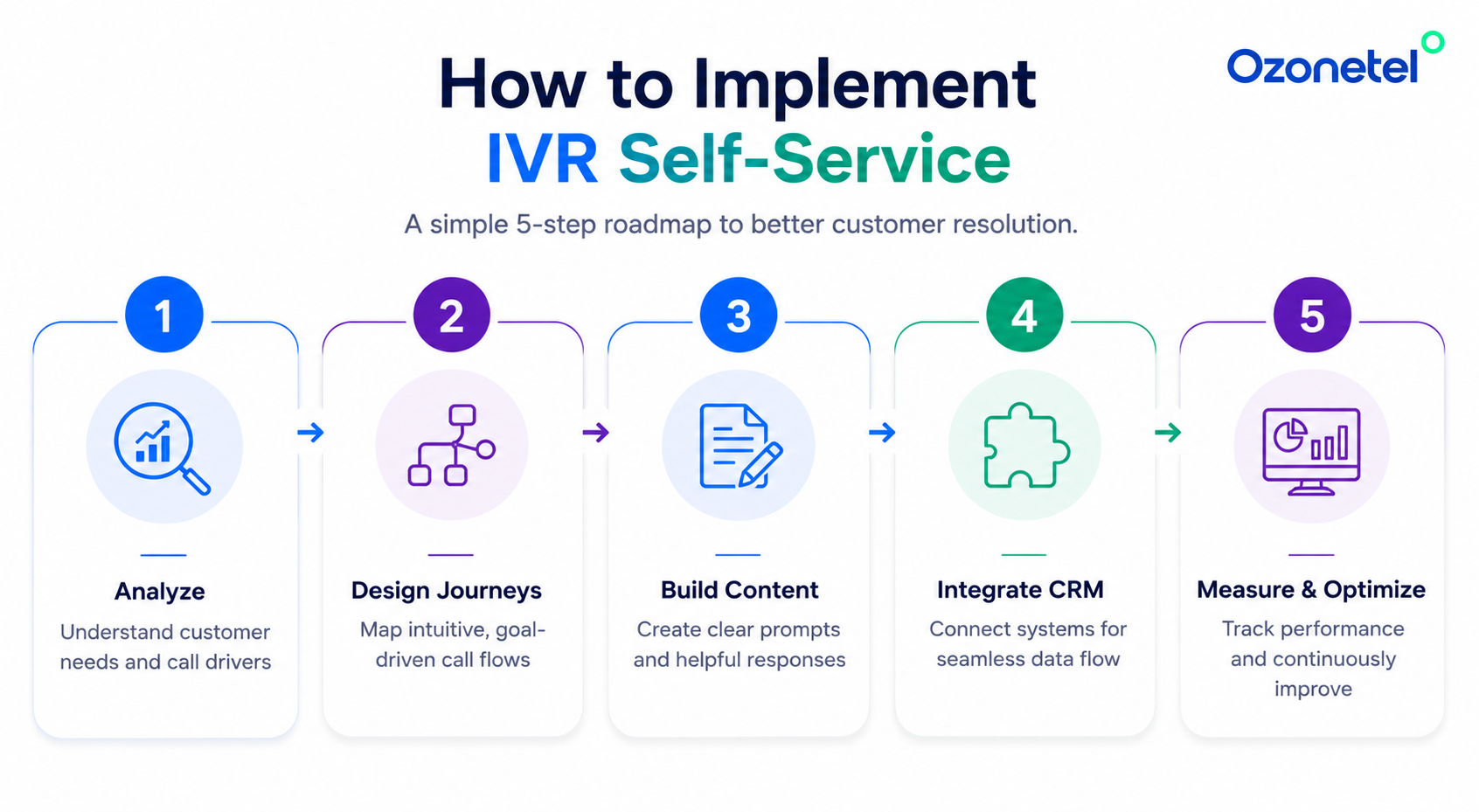
A successful IVR starts with the right customer journeys, not the longest menu. Focus on high-volume requests, connect your systems, and refine the experience over time.
Analyze Your Call Volume

Start with the last 60–90 days of call data to understand why customers are calling. In most contact centers, 10–15 query types account for nearly 80% of call volume. Prioritize repetitive, transactional requests—such as balance inquiries, order tracking, appointment management, and payments—that can be resolved without agent intervention.

Design Customer Journeys, Not Menus

Map each customer journey before building your IVR. Identify the information required, the backend systems involved, the desired outcome, and a clear fallback path if self-service can’t resolve the request. Design around customer intent, not your internal departments.

Build Around Real Customer Conversations

Use call recordings, agent transcripts, support tickets, and FAQs to understand how customers actually ask for help. Focus on automating the handful of queries that drive most of your call volume before expanding to less common scenarios.

Integrate with CRM and Backend Systems

An IVR is only as effective as the data behind it. CRM and backend integrations allow the system to recognize callers, retrieve account information, personalize responses, and complete transactions instead of simply routing calls. Ozonetel integrates with platforms like Salesforce, Zoho, Freshdesk, HubSpot, LeadSquared, and custom business applications through open APIs.

Measure, Optimize, and Improve

Launching your IVR is just the beginning. Track key metrics such as containment rate, abandonment rate, escalation rate, and post-IVR CSAT to identify gaps. Regularly review failed interactions, refine call flows, and update your knowledge base based on changing customer behavior. Continuous optimization is what keeps self-service effective over time.
When Should You Upgrade to Conversational AI IVR?

Traditional IVR works well for simple, repeatable requests. But as customer journeys become more complex, there comes a point where menus and scripted responses aren’t enough.

It’s time to upgrade to Conversational AI IVR if:

  • Your containment rate has plateaued below 60% despite optimizing menus and call flows.
  • Customers frequently press “0” or ask to speak to an agent immediately.
  • Supporting multiple languages with menu-driven IVR is becoming difficult.
  • Agents still spend most of their time handling routine, repetitive requests.
  • Customers increasingly ask complex, conversational questions that scripted IVR can’t understand or resolve.

At that stage, the challenge isn’t your telephony platform, it’s your IVR’s ability to understand intent and act on context. Conversational AI IVR adds natural language understanding, CRM-powered personalization, and continuous learning on top of your existing contact center, allowing customers to speak naturally while resolving more interactions without agent intervention.

Conclusion

IVR self-service is no longer just about routing calls or reducing agent workload. When powered by AI and connected to your CRM and business systems, it becomes a smarter way to resolve customer requests, personalize every interaction, and deliver consistent support at scale. Today’s leading enterprises are extending traditional IVR with conversational AI, voicebots, and enterprise context to create self-service experiences that understand intent—not just inputs.

Ready to Deliver Smarter Customer Self-Service?

See how Ozonetel’s AI-powered IVR helps enterprises automate routine requests, improve containment rates, and deliver faster customer support.

Prashanth Kancherla

Frequently Asked Questions

IVR self-service allows customers to complete routine tasks—such as checking account balances, tracking orders, making payments, or scheduling appointments—through an automated voice system, without speaking to an agent.

Both automate customer support, but they work on different channels. IVR self-service operates over voice calls, while chatbots handle conversations through web chat, mobile apps, or messaging platforms like WhatsApp. Together, they create a seamless omnichannel self-service experience.

A good containment rate typically ranges from 65–80% for speech-enabled IVR and 70–90% for Conversational AI IVR. If your rate consistently falls below 50%, it’s usually a sign of poor menu design, limited integrations, or inadequate self-service capabilities.

The most important metrics include containment rate, abandonment rate, escalation rate, average handling time (AHT), and post-IVR CSAT. Looking at these metrics together provides a clearer picture of how effectively your IVR is resolving customer requests.

Yes. Modern IVR platforms integrate with leading CRM, helpdesk, and business applications through APIs, enabling personalized conversations, real-time customer context, and automated transactions. Ozonetel integrates with Salesforce, Zoho, Freshdesk, HubSpot, LeadSquared, and custom business applications.

Most implementations fall short because they automate the wrong journeys, rely on complex menu structures, lack CRM integration, or don’t provide a seamless path to a live agent. Regular optimization based on customer behavior is equally important for long-term success.

Implementation timelines depend on complexity. A basic DTMF IVR can be deployed in a few days, while speech-enabled IVR typically takes 2–4 weeks. AI IVR generally takes 4–8 weeks, depending on integrations, workflows, and the number of customer journeys being automated.

Yes. Modern contact center platforms can integrate IVR dialers with predictive, progressive, preview, and power dialers. This allows businesses to automate outbound campaigns such as payment reminders, appointment confirmations, customer surveys, collections, and follow-up calls, while intelligently routing customer responses based on their input.

Share this post: